
This article covers Frequently Asked Questions about artwork banner size and how to re-size the image.
Recommended Banner Size and File Types
Recommended size of banner is 1000px wide by 200px high. The system will support .jpg, .png and .gif file types. The image file size must be smaller than 1mb.
Resizing Your Banner Artwork
If your banner artwork is too small (less than 1000px wide), the alignment on the page may be off center. If there is too much blank space at the right of the banner, try increasing the width of the banner.
If your banner artwork is significantly larger than 1000px wide, the image may extend beyond the page container. Try decreasing the width of the banner.
Resize your banner with a graphics editor such as Paint 3D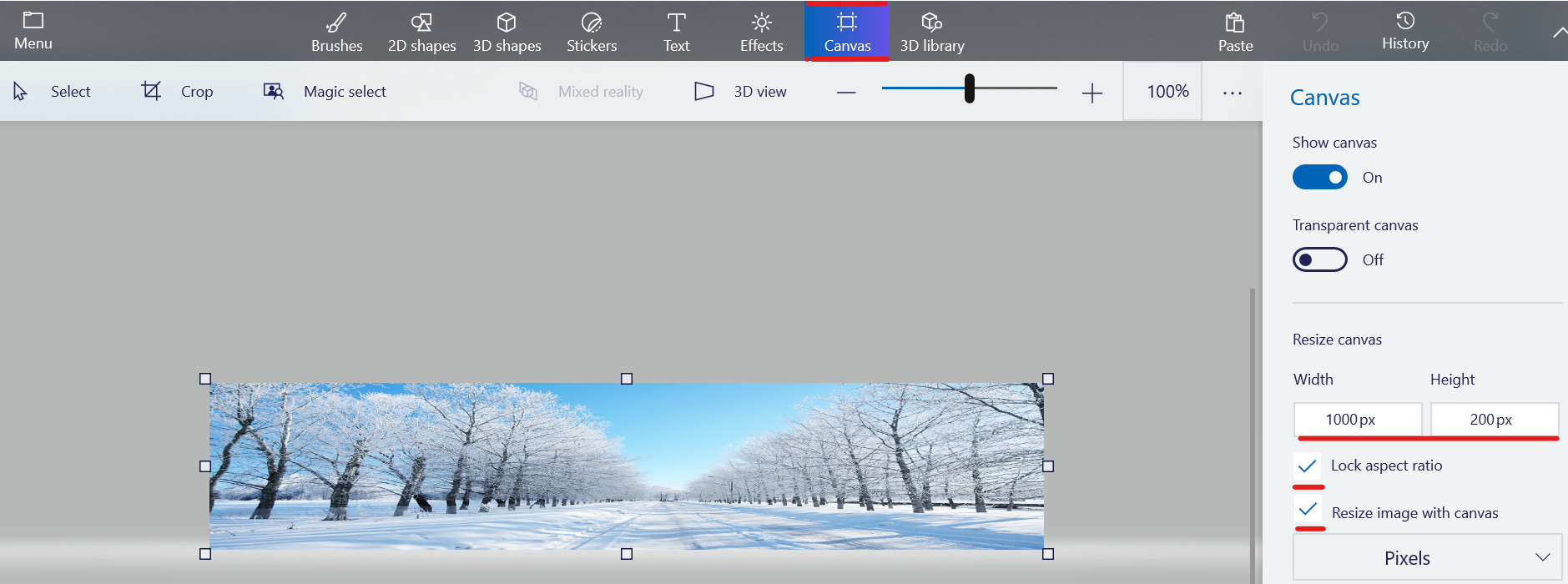
To re-size the image in Paint 3D, select Canvas.
Select Show Canvas = On
Check the boxes to select Lock Aspect Ratio and Resize image with canvas
Adjust the size of the image to the recommended 1000px wide in the Width box.
Save the new image and upload it to your event template.
Refer to Upload Banner Artwork for additional instructions on uploading the new image.
Comments
0 comments
Article is closed for comments.