
NOTE: If you have any questions regarding the awarding of an RFP, these need to be directed to the planner in charge of sending the RFP to your property.
You do, however, have some information available to you in the Supplier Portal.
1. Go to the AWARDED tab on your home page under RFP's: Here you will see a listing of responded RFP's that have been awarded in the last 90 days.
2. Click on the Meeting Name Link: In the below RED circle, the name of the hotel that was awarded the RFP will be displayed. To the right in the RED BOX, the planner may choose to provide additional information on why that property was selected.
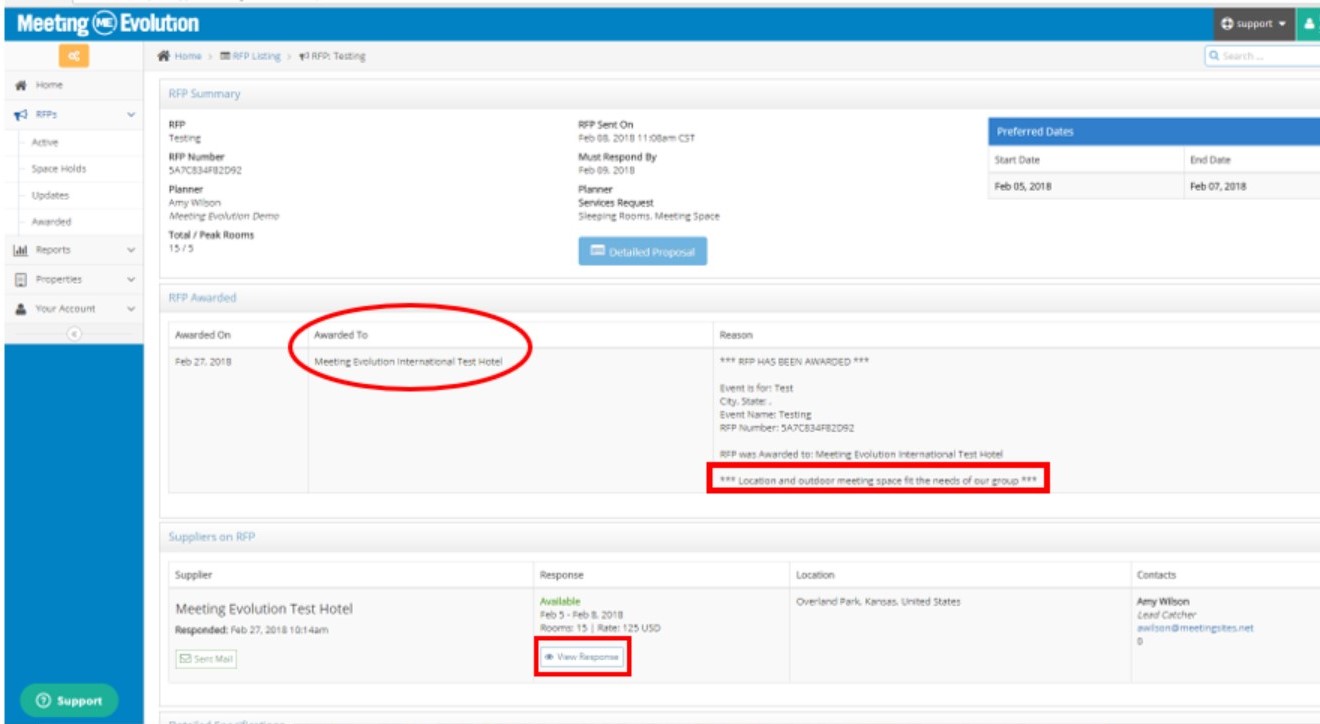
3. In the below section "SUPPLIERS on RFP" bar (maximize by clicking the "down arrow" on the right hand side): This will show your hotel information, you can view the RFP response by clicking on the VIEW RESPONSE button bordered in red. This is available for all contacts at the property, not just the contact that responded to the RFP.
Comments
0 comments
Article is closed for comments.